
Web Search
9. Web Search
Web Search is one of the chat tools available in SkyStudio Chat that allows you to search for information from current internet sources.
It can be used for questions that require up-to-date information from the web, such as recent developments, company announcements, product information, or economic data.
9.1. Using Web Search
To use Web Search, click the + icon in the message input area and select Web Search from the menu.
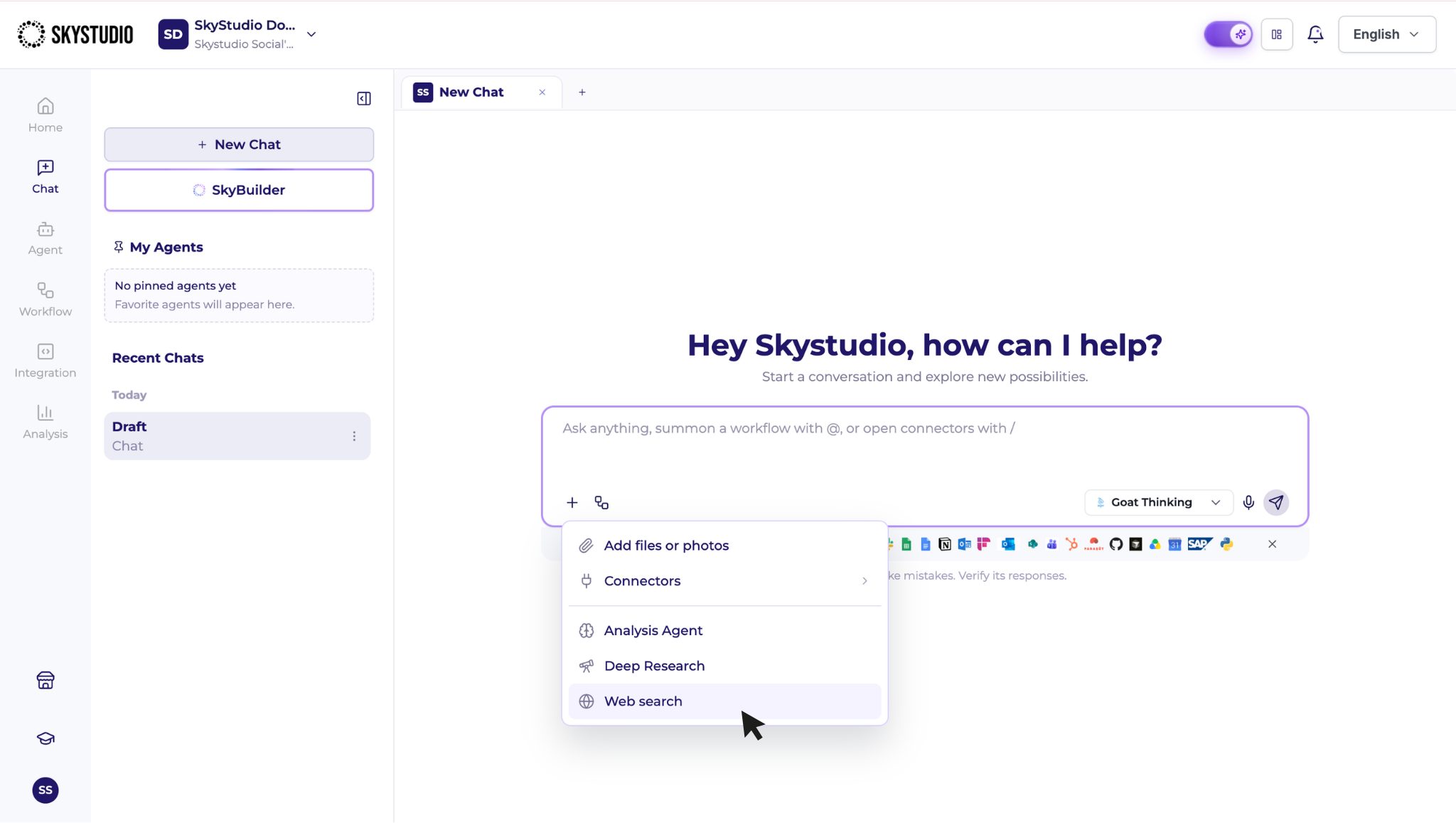
Then, enter the topic you want to research in the message input field.
For example:
- What are the major developments in artificial intelligence today?
- Research the latest economic data released this week.
- Research and compare the latest features of this product.
- Find the latest announcements from this company.
When Web Search is used, relevant sources on the internet are searched, and the information obtained from these sources can be used to generate the response.
9.2. Reviewing Web Sources
You can access the sources used in responses generated with Web Search.
Through the sources provided in the response, you can open the web pages where the information was obtained and review them directly when needed.
Web Search is particularly useful for:
- recent developments,
- company announcements,
- product information,
- economic data,
- topics that require information from current internet sources.
9.3. Difference Between Web Search and Deep Research
Web Search can be used when you need to quickly find up-to-date information.
Deep Research is more suitable for tasks that require a more comprehensive investigation of a topic, evaluation from multiple perspectives, or comparison of multiple subjects.